
The Regatta Racer Race Sim is a free sailing simulator that runs in your browser. Sail a one-minute start or a short windward/leeward race, or follow a guided lesson, while the Regatta Racer watch beside the course shows the numbers you would see on your wrist. The watch figures are worked out with the same calculations the app uses on the water. There is nothing to download and no account to create.
Guided lessons
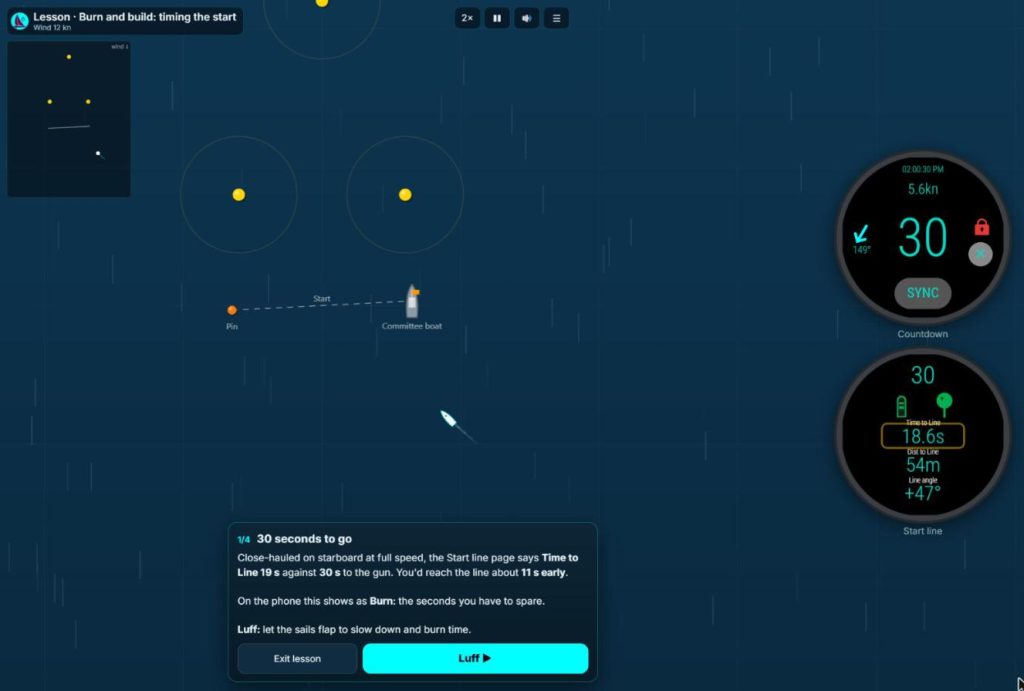
In each lesson the boat sails itself and stops to explain what the watch is showing. Tap to move on. Each lesson takes two to four minutes.
- Lesson 1Burn and build: timing the start
Time to Line against the countdown, luffing to burn off spare seconds, and when to build speed for the gun.
- Lesson 2Pinging the start line
How to ping each end with the bow on the line, and how to ping the pin from inside the line.
- Lesson 3Which end is favoured?
Reading Line angle close-hauled and head to wind to find the favoured end, then checking it again after the wind shifts.
- Lesson 4Wind shifts: when to tack
Spotting headers and lifts on each tack by comparing your heading with the average heading.
- Lesson 5Calling the layline
Using angle to mark (ATM) to judge the layline, and the buzz the watch gives when you reach it.
- Lesson 6Sailing a club course
Choosing a club course on the phone before the start, then following it mark by mark. The app moves on to the next mark when you pass within 25 m of it.
- Lesson 7Over early: what it costs
What happens when you are over the line at the gun, how to dip back, and how much time it costs you.
Sail it yourself
Sail a start or a full race on your own. Each can be sailed in three ways:
- Watch view shows the Regatta Racer Wear OS watch pages. It is the default.
- Phone view shows the Regatta Racer phone app instead.
- Sail blind replaces the watch with a plain countdown and stopwatch, so you can sail the same wind with and without the numbers and compare the results.
- One-minute start
Sail the last minute before the gun and try to cross the line at full speed just after it.
- Windward/leeward race
A start, then two laps of World Sailing course L2 with a leeward finish. It takes about four minutes.
The wind number on the menu sets the wind and the course, so the same number gives the same race. On a computer, steer with the left and right arrow keys, tack or gybe with Space, and hold the down arrow to luff. W changes the watch page and P pauses. On a phone, use the steering, Luff and Tack buttons along the bottom of the screen.
What you are seeing
On the watch before the start
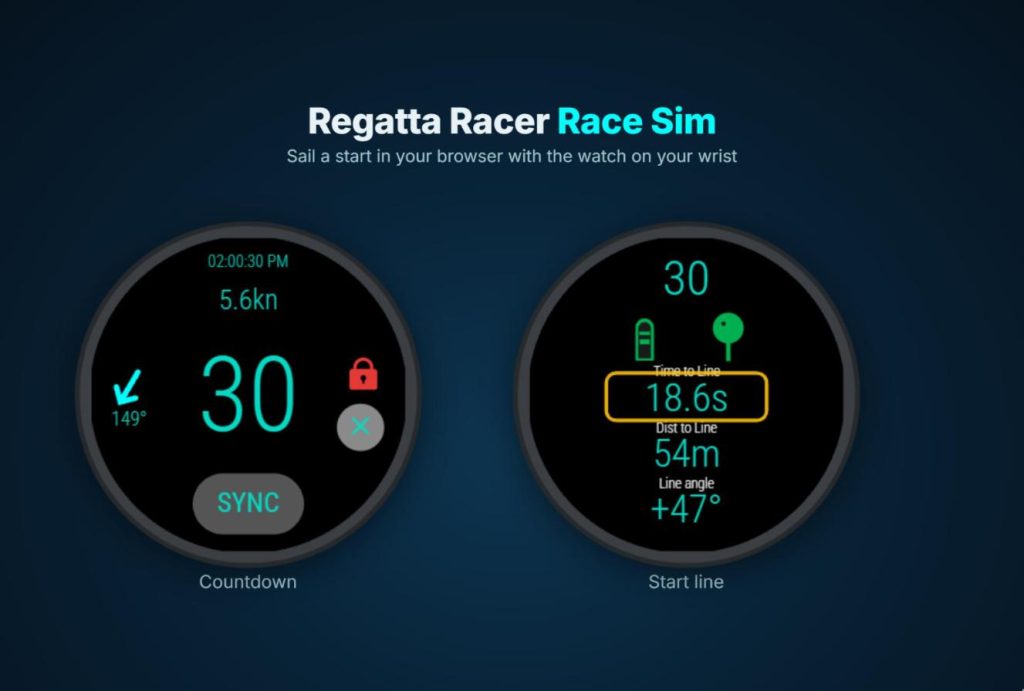
- Countdown page: the time, speed, heading with a north arrow, the countdown, screen lock and Sync. Sync rounds the countdown to the nearest minute, so one press on a signal puts you back in time with the committee boat.
- Start line page: the countdown, the boat and pin markers (green once pinged), Time to Line, Dist to Line and Line angle. Time to Line against the countdown tells you whether you will be early or late. Line angle tells you which end of the line is favoured.
On the watch while racing
- Speed page: speed, heading, average heading and the race timer. After each tack the average heading waits 15 seconds, then averages your last 90 seconds, so a header or lift shows up as a difference between your heading and the average.
- Mark navigation page: an arrow to the next mark with speed, heading, distance to mark (DTM) and angle to mark (ATM), plus the leg on a club course. When you reach the layline the watch gives three long buzzes, so you know when to tack without looking down.
On the phone while racing
The phone app has four pages that you swipe between. In the sim, tap the phone to change page.
- Compass: speed, heading, the leg, DTM, ATM, VMC and time to mark (TTM), with a compass rose that shows where the mark is.
- Live map: your track coloured by speed, with the start line and the course marks.
- Big numbers: speed, leg, DTM, ATM, VMC and TTM in large type.
- Numbers: VMC, DTM, distance to layline (DTLL) and ATM.
VMC and TTM are on the phone only. The watch keeps to the figures you can read at a glance.
The club course lesson uses a made-up club, the Regatta Racer Sim Club. The real club courses in the app are listed on Clubs and courses.
Use it on the water
Regatta Racer runs on Android phones and Wear OS watches, including Samsung Galaxy Watch4 and later. The countdown timer and speed display are free with no time limit. Start line tools, windward/leeward navigation and race replay are free for your first five races, and club course navigation for your first three course races. After that they are part of Premium or a club course add-on. See all features and pricing.

Common questions
Is the Race Sim free?
Yes. It runs in your browser, with nothing to download and no account or sign-up.
Do I need the watch or the app to use it?
No. The watch and phone screens are drawn in the sim. You only need the app to see the same numbers on the water.
Which watches does Regatta Racer work on?
Wear OS 3 and later, including Samsung Galaxy Watch4 and later. The watch needs built-in GPS for speed and the start line tools. The watch app works on its own or alongside the Android phone app.
Does the sim work on a phone?
Yes. On a phone it shows one watch page at a time: tap the watch to change page, and steer with the buttons along the bottom of the screen. On a computer you see two watch pages at once and can steer with the keyboard.
How realistic is the boat?
It is a simplified model of a generic 7 m keelboat without a spinnaker. Wind shifts come every 70 to 110 seconds, far more often than on the water, so a four-minute race still has shifts to play. The watch numbers use the app’s own calculations with simulated GPS error, so they lag and jump the way the real watch does.